

How to Summarize an Email Thread in Outlook and Gmail
The fastest way to summarize an email thread in Outlook or Gmail is a browser extension that reads the thread where it is. With Mail2Action, you open the thread, click once, and get a structured summary plus a list of action items with owners and due dates — no copying text into a chatbot.
Updated
Add to Chrome — It's FreeHow do I summarize an email thread in Outlook?
- Install Mail2Action from the Chrome Web Store.
- Open Outlook on the web (outlook.office.com, outlook.office365.com, or outlook.live.com) and open the thread.
- Click the Mail2Action button. The side panel shows the Summary: the context, what was decided, and what is still open.
Works with work and personal Microsoft accounts, without a Microsoft 365 Copilot license. Comparing options? See Mail2Action vs. Copilot and Gemini.
How do I summarize an email thread in Gmail?
- Install Mail2Action from the Chrome Web Store.
- Open the thread in Gmail.
- Click the Mail2Action button next to the thread to open the side panel with the summary.
The same extension works in both, so you get identical results whether a thread lives in Gmail or Outlook.
How do I turn an email thread into action items?
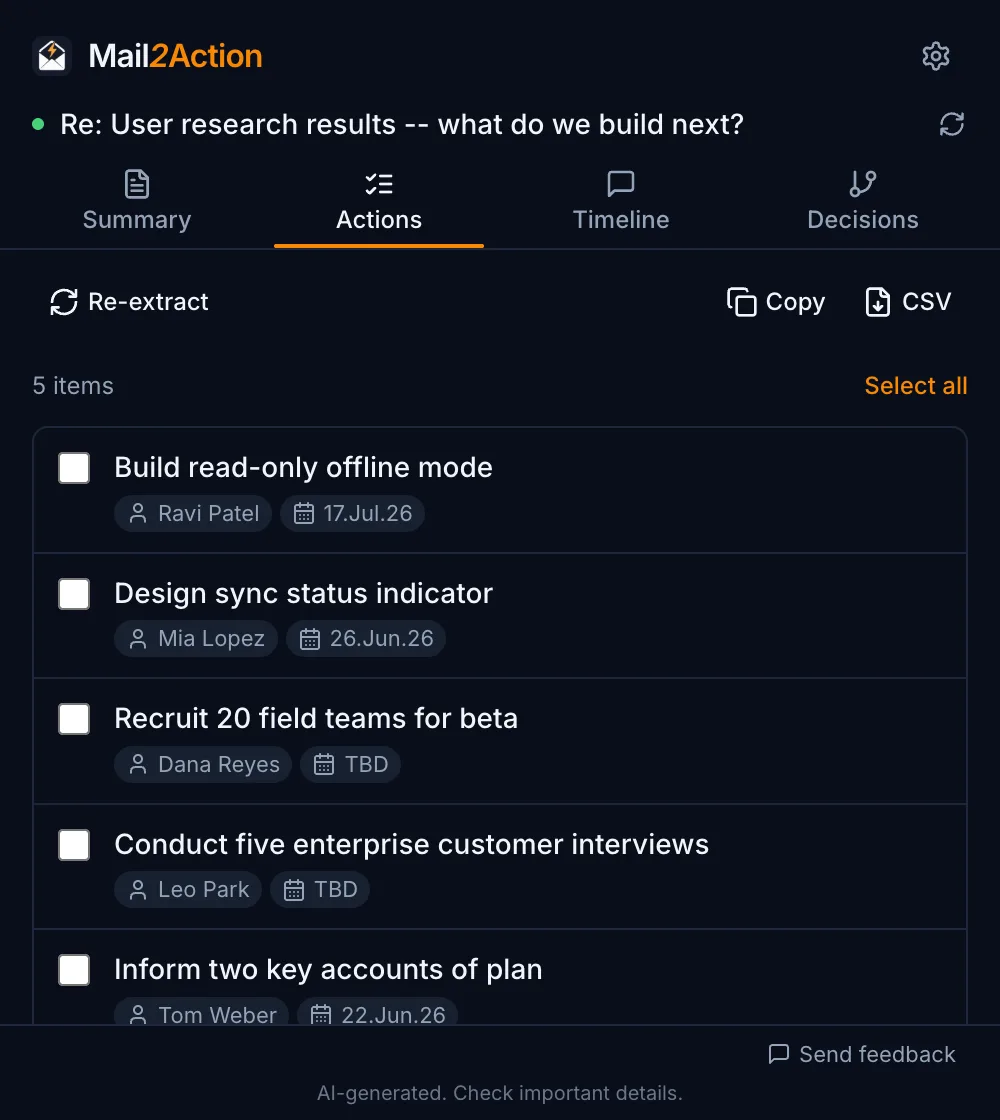
Switch to the Actions tab. Mail2Action lists every task someone agreed to, with the owner and the due date (or TBD). Tick what you need and copy it, or export it as CSV (Pro) for Asana, Jira, Trello, or a spreadsheet.
Want to see how the discussion unfolded instead? The email thread visualizer shows the same thread as a timeline, reply tree, or decision flowchart.
Which AI prompts work best for summarizing email threads?
If you prefer to paste a thread into ChatGPT, Claude, or Gemini, these prompts give structured, usable answers. Mail2Action runs prompts like these for you, tuned for each view.
Executive summary
Summarize this email thread in 5 bullet points: the main question, what was decided, open issues, who is responsible for what, and the next deadline.
Action items
List every action item in this email thread as a table with the columns Task, Owner, Due date. Write TBD if no date was given. Only include tasks someone agreed to do.
My next steps
I am [your name]. From this email thread, list only the actions I am responsible for, with deadlines, and anything I still need to reply to.
Catch-up briefing
I was not on this thread. Explain in 3 sentences what happened, where people disagreed, and how it was resolved.
Is it safe to summarize work email with AI?
With the included Mail2Action AI, the thread text is processed only to create your result and is never stored or logged; it is not used for training. If your company prefers its own AI account, add your own API key for OpenAI, Google Gemini, Anthropic Claude, or xAI Grok — the text then goes directly from your browser to that provider. Details are in the privacy policy.